The "iPhone Calendar Scam", often called the "calendar virus", isn't actually a virus but a clever phishing tactic where scammers trick you into subscribing to a rogue calendar. Once subscribed, your phone is flooded with fake notifications like "Your iPhone is infected" or "You won a prize" — designed to frighten you into clicking malicious links.
The iPhone Calendar Virus Scam
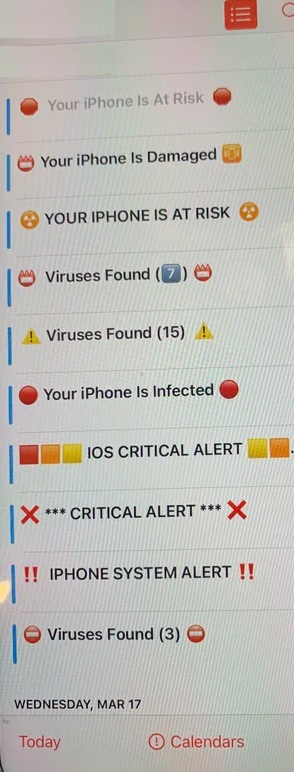
How to Remove the Scam
- Open the Calendar App and find a spam event and tap on it.
- Tap "Unsubscribe" from this Calendar at the bottom of the screen.
- Tap "Unsubscribe" again to remove all associated events permanently.
If the "Unsubscribe" button is missing, sometimes the subscription is hidden in your settings:
- Go to Settings > Calendar > Accounts (or Subscribed Calendars).
- Look for any account you don't recognise (e.g., "Calendar Events" or "Click Here"). Tap it and select Delete Account.
Crucial Safety Rules
- Never Click Links: Do not click anything inside these events; they are designed to steal your credentials or financial info.
- Don’t Decline: Avoid tapping "Decline" or "Maybe" on individual invites, as this tells the scammer your email is active and makes you a target for more spam.
- Official Warnings: Remember that Apple never sends virus warnings or prize notifications through the Calendar app.